

At a Glance
Pros
- Fast as any Gen 4 drive
- Sensibly priced
- Should work with PS5
Cons
- No hardware encryption
- No heat spreader included
- Only 1- or 2TB
Our Verdict
If you put aside the lack of encryption, everything else about the Exceria Pro is good or excellent. It’s one of the fastest Gen4 designs, marginally undercuts most of its competitors and provides a sufficient lifespan for most users.
For those wondering who Kioxia is, this business went under the modest title of the Toshiba Memory Corporation before it was spun off from the rest of Toshiba and given new branding.
But long before that happened, Toshiba Memory Corporation invented NAND Flash memory in the early 1980s, the memory technology at the heart of the Kioxia product I’m reviewing today.
In the chronicles of Gen 4 NVMe storage, Kioxia hasn’t exactly rushed to deliver its first products to market. Others got their products out much earlier, though some of these early designs didn’t live up to their billing and have subsequently been replaced with revamped second-generation solutions anyway.
So what has the Exceria Pro got to offer PC builders that they can’t get from rivals like Samsung, Crucial and Corsair?
Design & Build
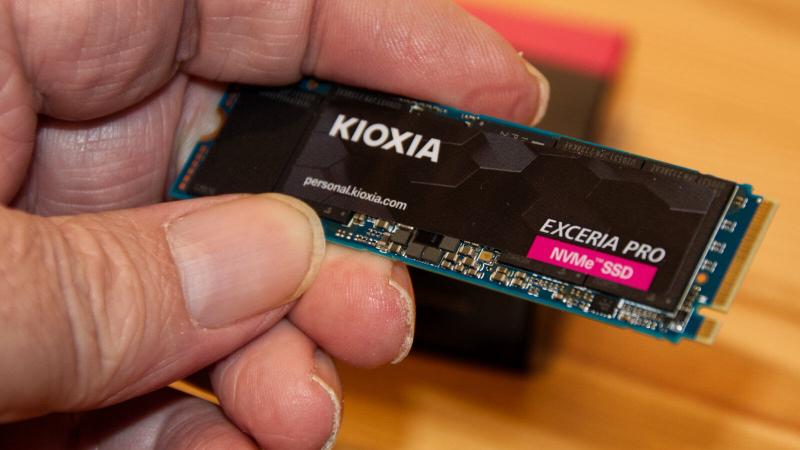
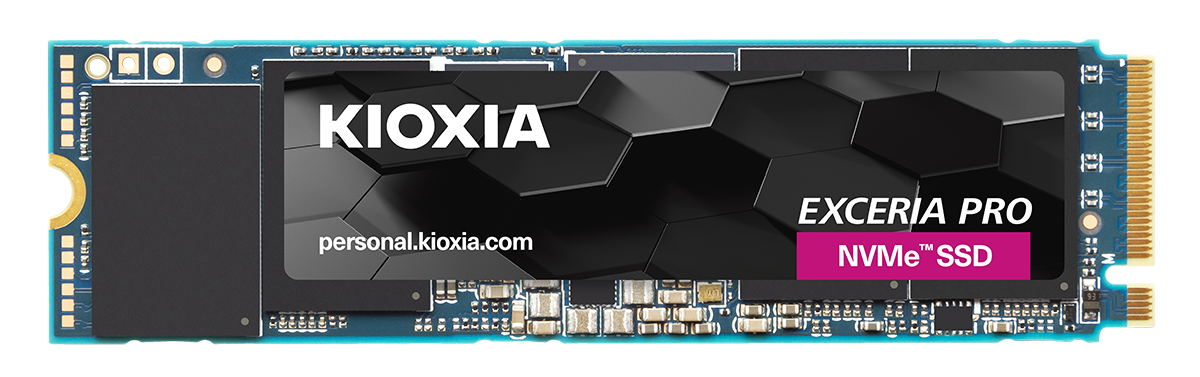
The review sample sent by Kioxia was a 2TB version of 2280 M.2 stick, and this comes without a heat spreader attached to the single-sided NVMe board.
What’s slightly odd is that Kioxia created a label for the top face of the Exceria Pro that covers all the chips except for the NAND module on the far left, enabling us to easily read that part number without removing it.
These NAND modules are BiCS TLC 3D Flash Memory, and on the 2TB drive, there are four chips, each probably containing two 1Gbit NAND modules and half as many on the 1TB drive. Because the performance of the 1TB drive is as good or better than the 2TB reveals, the bandwidth between the controller and the NAND must be the same on both capacities.
Kioxia doesn’t offer the Exceria Pro in any other capacities, as this product is considered exclusively for ‘Professional users’. This is perhaps why there’s no sizes smaller than 1TB available but doesn’t explain why there’s no 4TB option.

Many NVMe board makers go with designs where the controller and discrete electronics are at one end, the design of the Exceria Pro has the NAND modules at either end with the controller sitting in the middle.
Where other brands are happy to provide detailed specifications of their controller and cache configuration, Kioxia doesn’t include this information in the specs. The controller is almost certainly a custom part created by the makers specifically for this product, but Kioxia hasn’t confirmed or denied that assumption.
To get the full performance from the Exceria Pro requires a Gen 4 PCIe M.2 slot with all four lanes, delivering a maximum of 8GB/s of bandwidth from the drive to the host system.
Specs & Features
Being a little late to the Gen 4 SSD party, I wondered what Kioxia included that might set the Exceria Pro aside from the herd.
In the specifications, Kioxia quotes a read and write speed of 7,3000 and 6,400MB/s and maximum IOPS of 800,000 reading and 1,300,000 writing. Those numbers are right at the top of what Gen 4 drives can achieve with this 8GB/s interface and are bordering on the theoretical limits.
The TBW (Total bytes written) is 400TB for the 1TB model and 800TB for the 2TB design. I should clarify that those numbers are calculated based on the worst possible random write scenarios. Both drive sizes should survive the five-year warranty if they stay within those TBW boundaries.
One feature that’s notably missing is hardware encryption, available on several competitor products such as the Corsair MP600 Pro LPX and Crucial P5 Plus. Arguments have been made that gaming drives don’t need hardware encryption, but given how Kioxia has positioned the Exceria Pro as being above its enthusiast pitched Exceria Plus G2 series, perhaps it should have had it.
It is much more difficult to be critical is the performance that this unit can deliver, being up there with the Seagate FireCuda 530 and Kingston KC3000 in terms of raw speed of reading and writing.
Performance
One peculiarity of this design is that the 2TB has a 20% lower read IOPS than the 1TB model but 18% faster write IOPS. This hints that whatever cache mechanism Kioxia uses favours the extra space on the larger drive. But, conversely, for best read speeds, the amount of NAND is a hindrance.
In synthetic benchmarking, the Exceria Pro 2TB hit the quoted 7,300MB/s read speeds but fell slightly short on the write performance, generally being closer to 6,000MB/s.
CrystalDiskMark 8.0.4 default profile scored 7,385MB/s reads, and 5,998MB/s writes, a good score even if write speed never hit its full potential on the test system. AJA scored the drive 5923MB/s read and 5548MB/s write. Numbers close to those CrystalDiskMark showed with a ‘Real World’ profile, and AS SSD also indicated.
ATTO is an old but reliable test that isn’t often fooled by caching tricks and it recorded a peak read of 6.97GB/s and a best write speed of 5.62GB/s. And finally, PCMark 10 storage test for system drive scored the Exceria Pro 2723 on my test system, which is highly respectable.
These results put the Exceria Pro on par (or a little better in some tests) than the two best Gen 4 drives we’ve previously reviewed, the Seagate FireCuda 530 and Kingston KC3000.
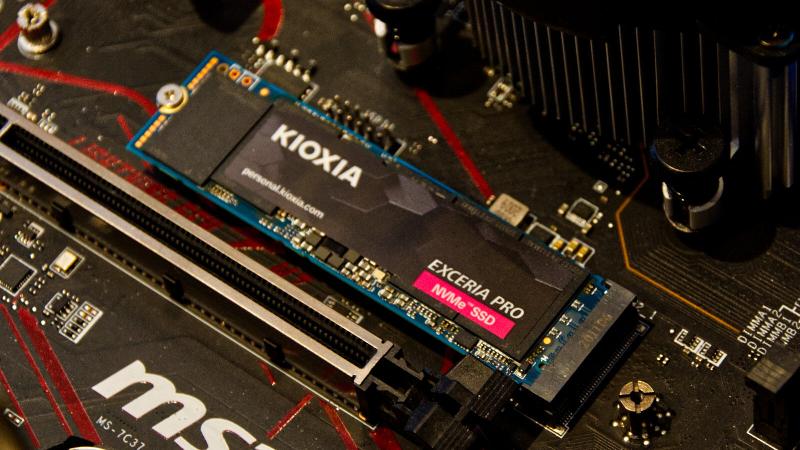
My only concern about this design is that the lack of a heat spreader makes reaching the thermal limits of this design more likely under stress and that without active cooling, it will throttle.
While benchmarking, it did reach 75C on a few occasions, the point where throttling is employed by the module to avoid overheating.
Price
In the UK, the Exceria Pro can be found for around £172.98 and £294.99 for the 1TB and 2TB models through the online retailer Ebuyer, though it is more expensive at other retailers such as LamdaTek and Comet.
However, Kioxia tells me that once sufficient stock enters the market the price will be £249.99 for the 2TB option, a level that would make this drive an instant success.
Sadly, customers Kioxia withdrew from the US market in 2019, resulting in its line-up of consumer flash and storage products are no longer available in the United States. It can still be found through imports from Japan and Europe, though based on the current high cost of international mailing, this might not prove economically viable.
If we compare the 2TB drive with its competitors, even at the current pricing the Exceria Pro is cheaper than the Seagate FireCuda 530 (£317.99), Samsung 980 Pro (£319.98) and Corsair MP600 Pro LPX (£312.22), but many of those designs do come with a heat spreader.
It’s undercut by the WD Black SN850 (£284), but that drive has much lower write performance than the Exceria Pro.
Overall, if you don’t intend to add a heat spreader, you can save a small amount by picking the Exceria Pro, and that might be more significant for those with a tight budget or who are building multiple systems.
Check out our chart of the best SSDs to see all your options.
Verdict
The stand out feature of this design is the excellent performance, and Kioxia has aggressively priced it to get it better noticed by system builders.
When you combine these advantages, the other minor issues regarding endurance and lack of encryption can seem less of a hindrance to purchasing. The TBW of this product isn’t bad, as it’s the same as the WD SN770 and Crucial P5 Plus, but it is not as good as the Seagate FireCuda 530 or Kingston KC3000.
Therefore, if you intend to drive an SSD to the point of NAND failure, then the Seagate or the Kingston might be a better choice.
Unless you must have hardware encryption, the Exceria Pro is a good choice for performance-related tasks. The lack of the integrated heat spreader allows it to be installed in a laptop, and it is equally at home in a desktop system.
The only caveat to PS5 and laptop use are that when this drive works hard, it gets hot, and without a heat spreader, it can throttle. In a desktop system or a PS5, a third-party heat spreader is probably a solid investment. How well it works in a laptop will be directly related to how much ventilation and the room it has in the M.2 slot.
A 4TB model would have been nice, but not all makers offer this option, and maybe one can be added later.
Overall, the Exceria Pro is a solid entry to the Gen4 NVMe selection, and more choice is always a good thing.
Specs
Kioxia Exceria Pro: Specs
- Capacities: 1TB and 2TB
- Colour: Black
- Form Factor: M.2 Type 2280-S2-M
- Controller: Unknown
- Flash Memory: 112-Layer BiCS TLC 3D Flash Memory
- Dimensions: (L x W x H): 80.15 mm x 22.15 mm x 2.23 mm
- Weight: 8.0g (2TB), 7.6g (1TB)
- Interface: M.2 NVMe PCI slot (PCIe Gen4, downgradable to Gen3, Gen2 and Gen1)
- Quoted Sequential Read: 7,300MB/s
- Quoted Sequential Write: 6,400 MB/s
- Quoted Random Read IOPS (1TB, 2TB): 1,000K, 800K
- Quoted Random Write IOPS (1TB, 2TB): 1,100K, 1,300K
- Total Bytes Written (1TB, 2TB): 400TB, 800TB. Active Power Consumption: 8.9W (typ.) Warranty: 5 years