

At a Glance
Pros
- Easy to install
- Automatic recording
- Good video and image quality
Cons
- No display
- Alexa controls aren’t very useful
- No microSD card included
Our Verdict
iOttie’s simple dash cam is a good choice for anyone looking for something to install and forget. Image quality is good and there are just about enough features to warrant the price. Don’t get too excited about the Alexa integration, though.
Dash cams are increasingly becoming an essential accessory for drivers. Not only do they record videos that can be used to prove fault in a collision, but in many cases they can reduce the cost of car insurance.
A name new to dash cams is iOttie. It’s a brand you might know for its smartphone holders and chargers that are designed to work in your car (and home). But it has expanded its range to include the Aivo View, a dash cam that has Amazon’s Alexa built in for voice-activated commands.
Features & Design
- Easy installation
- Remote Control button
- Records to a microSD card (not included)
The Aivo View has a simple, clean design. The main unit is a rounded off square that measures 65 x 65 x 35mm, although the casing does taper towards the front panel where you find the camera lens. On the right flank there’s a micro-USB charging port, while the left is home to a microSD card slot that you’ll need to fill as the Aivo View doesn’t have any internal storage.
The device doesn’t come with a memory card in the box, so factor in the extra cost if you don’t have a spare one you can use.
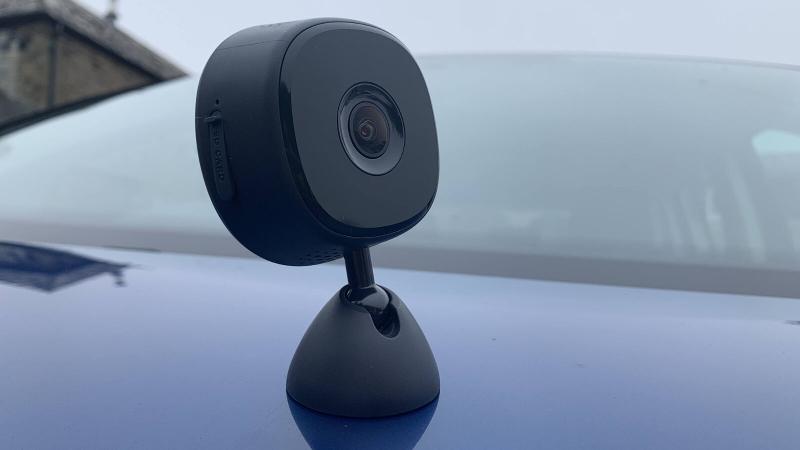
Jutting out of the top of the unit is a short stalk that connects to the base (the photo about is slightly confusing because we’ve photographed it upside down).
The base attaches to the windscreen via a sticky pad, which seems puzzling as iOttie offers plenty of suction-cup style holders in its catalogue, and this method demands that you permanently affix the Aivo View to your windscreen.
However, all is not quite as it seems: a small metal disc in the base is all that actually sticks to the windscreen, while the rest of the camera can be detached and reattached via its strong magnet.

A long micro-USB cable is included in the box which connects the Aivo View to the supplied USB charger that itself plugs into your car’s cigarette lighter socket. Of course, only people of a certain age still call it that: modern cars ditch the actual lighter and label it the 12V accessory socket.
Routing the wire along the top of the windscreen, down the A-pillar and to the accessory socket might sound like a bit of a faff, but iOttie includes a couple of cable clips that prevent the cable from dangling in front of the driver’s view.

As you’ll see from the photo above, there is no display on the Aivo View. So if you want to view the footage that’s recorded on the microSD card, you’ll need to use the accompanying app.
This is also how you can change the default settings. If you have the Alexa app on your phone, then you’ll also be able to connect to the Aivo View and issue a few commands by voice while driving. iOttie includes a physical remote control button (which woks using Bluetooth) that you can stick somewhere in reach of the driver and press it to instantly take a photo or record a video.
iOttie Connect App
- See live display of videos
- Change duration of recordings
- Amazon Alexa (US only)
Once you’ve downloaded the iOttie Connect app and set up your account, which only takes a minute or two. Then you can connect to the Aivo View via a local Wi-Fi connection between phone and dash cam and see the available settings.
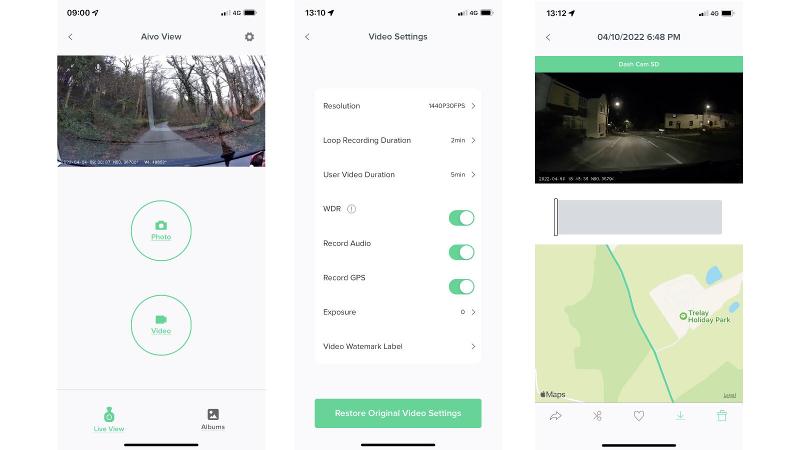
The main page shows the live feed of the camera along the top, with two large buttons for capturing video or photos. The default setting is for the camera to automatically record two-minute loops of footage continually and, when the microSD card is full, go back and overwrite the oldest clips. This is the way all dash cams work and means the Aivo View doesn’t simply stop recording when the card is full.
Note that recording starts automatically when you turn on the ignition and stop when the engine is turned off. There is a Collision Detection feature that registers a potential crash and marks the video as important and ensures it doesn’t get overwritten when the card is full.
If you prefer longer or shorter video clips, the app allows you to change from one minute up to five minutes. There are also settings to determine how long a recording you start yourself (by pressing the physical or on-screen buttons) will be. You can use the app to download selected recordings or photos to your phone, but the transfer rate is slow, so remember to do it when you have some time on your hands. As an example, one two minute video at 1440p resolution took 15 minutes to transfer from the Aivo View to my iPhone. Photos, obviously, are much quicker.
You can, of course, use a microSD card reader in your laptop or PC to copy the files much faster.
The app has a few other key settings, including the ability to record the GPS position of your vehicle alongside the video or photos. This is then displayed on a map when reviewing the footage on your phone. There are also options to choose which data is displayed on the recording and whether sound is recorded or not.
Alexa
One of the Aivo View’s selling points is that it works with Amazon’s Alexa app via a dedicated skill, meaning you can control the device with your voice. Hands-free control is of course particularly useful when driving.
Unfortunately, I was unable to test this as I’m based in the UK and the Aivo View is currently sold only in the US. The Alexa skill is similarly restricted to those with a US Amazon account, and short of faffing around with changing my own UK account, it meant I couldn’t check how well it worked.
What I do know is that I wasn’t missing much: commands include “Alexa, tell dash cam to start recording”, “Alexa, tell dash cam to take a photo” and “Alexa, tell dash cam to turn on [or off] the mic”.
Video quality
- 1600p/30fps maximum setting
- Good low-light performance
- Sony STARVIS sensor
The good news is that videos and photos captured by the Aivo View are sharp and detailed. The Sony STARVIS image sensor does a fine job of capturing well-exposed footage that also has good contrast. It isn’t bad at night, either. The 140° field of view is perfectly standard for a dash cam, offering the right balance of capturing what’s happening on the periphery without making vehicles in front (and their registration plates) too small to see.
You can use the app to increase resolution to the fairly unusual 1600p/30fps, but the default setting of 1440p/30fps returns very usable quality, while creating smaller file sizes. There are lower settings too, including the option of 60fps at 1080p.
Here’s a few examples of video during the day and at night to show the kind of quality you can expect. Just bear in mind that our video player has compressed the files slightly, so the originals have better
1440p/30fps (Night)
1600p/30fps (Day)
1600p/30fps (Dusk)
1600p/30fps (Night)
There is a parking mode available, which will automatically turn on the camera and begin recording if it senses any kind of impact, but you’ll need to power the cam by a USB power bank, as once the engine is turned off the camera can’t draw any power from the car itself.
Price & Availability
The iOttie Aivo View is available direct from iOttie in the USA. The company confirmed that it will ship overseas, but of course as I discovered, that doesn’t mean the Alexa feature will work.
It costs $149.99 (approx £115/€139, but remember to factor in taxes and import duty if importing). Other iOttie devices are available in the UK and Europe via Amazon, so it could be that the Aivo View is also sold locally on Amazon but it wasn’t at the time of review.
For alternatives, see our roundup of the best dash cams.
Verdict
As a first attempt at a dash cam, the Aivo View isn’t bad at all. It ticks all the important boxes: good video quality, easy operation, built-in GPS. Some might dislike the absence of a screen and being forced to use an app, and given this, you might expect it to be a little cheaper.
But if you’re looking for a dash cam that’s simple to install and gets on with the job without fuss, then the iOttie Aivo View is a solid choice. The video quality is good, even at night, and the app doesn’t overwhelm you with options or require tweaking to get the best out of the device.
I would have preferred the option of a suction-cup mount, for Alexa to work outside the USA, and for iOttie to have bundled a microSD card in the box at this price. But the positives definitely outweigh these slight drawbacks.
Specs
iOttie Aivo View: Specs
- 140-degree field of view
- Sony STARVIS CMOS image sensor
- Up to 1600p resolution video recording
- Automatic loop recording
- Collision Detection
- Parking Mode (via external power source)
- Accompanying iOS & Android apps
- External Bluetooth button
- GPS
- microSD card slot
- Magnetic base
- 6.5cm x 6.5cm x 3.5cm