


At a Glance
Pros
- Three displays, dude!
- Three HDMi, three DisplayPort
- 100W PD for laptop
- 20W USB-C at front
Cons
- USB-C not Thunderbolt
- Single downstream USB-C
Our Verdict
If you want a lot of screen space the Plugable USB-C Triple Display 4K Docking Station is your savior. It allows you to connect up to three external displays to your laptop or other USB-C device, including two 4K monitors at full 60Hz.
Docking stations are perfect if you want to add an external monitor to your laptop to give you a desktop-like setup—either mirroring the laptop screen or creating a separate screen to give you more space to work with.
Most of our recommended USB-C docks are capable of adding two external displays, but this dock can give you three—while still using the laptop’s screen as a fourth if you need it.
As its name suggests, the Plugable USB-C Triple Display 4K Docking Station (UD-ULTC4K) can indeed connect your laptop to up to three monitors. It’s the company’s flagship USB-C dock.
It was updated in June 2022 with new chips, more charging power and a much-improved port setup.
It uses a combination of USB-C DisplayPort Alternate Mode (“Alt Mode”) and DisplayLink USB graphics—for its two DisplayPorts and one HDMI port; more on which later if you want to get technical.
The dock sits upright on a stand, so it takes up less desk space than many horizontal docking stations—which could be important with three hulking screens sat there. But if you prefer a low-profile dock, this one is not for you.

Plugable
Plugable UD-ULTC4K features
- USB-C 3.1 Gen.2 (10Gbps) connection to host laptop, charging at 100W (PD)
- Two DisplayPort 1.2 and two HDMI 2.0 (DisplayLink)
- One DisplayPort 1.2 and one HDMI 2.0 (Alt Mode)
- Four rear USB-A 3.0 ports (5Gbps, 4.5W)
- Gigabit Ethernet
- One front-facing USB-C 3.0 port (10Gbps, 20W)
- One front-facing SD Card Reader (UHS-II)
- Front-facing Audio In/Out – 3.5mm jacks for attaching headphones, speaker or microphone
- 135W power supply
The standout features are the six display ports. You can’t use all six at the same time but you can mix and match display types.
HDMI has the most market share so will be found on more displays but DisplayPort is the more able and sophisticated. HDMI actually uses DisplayPort technology as its base.
The 100W PC charging is enough for even larger laptops, and the front-facing 20W is powerful enough to charge a large tablet and any smartphone.
rated at just 4.5W power, the USB-A ports are really for data only (such as connecting a wired keyboard or mouse, memory stick or printer), rather than for charging devices such as smartphones.
The original UD-ULTC4K had no card reader slots. This has been rectified on the latest version with a fast UHS-II SD Card reader. This can be useful for adding highly portable, inexpensive flash storage for backups, for example.
Plugable
Three displays from one dock. How’s that done?
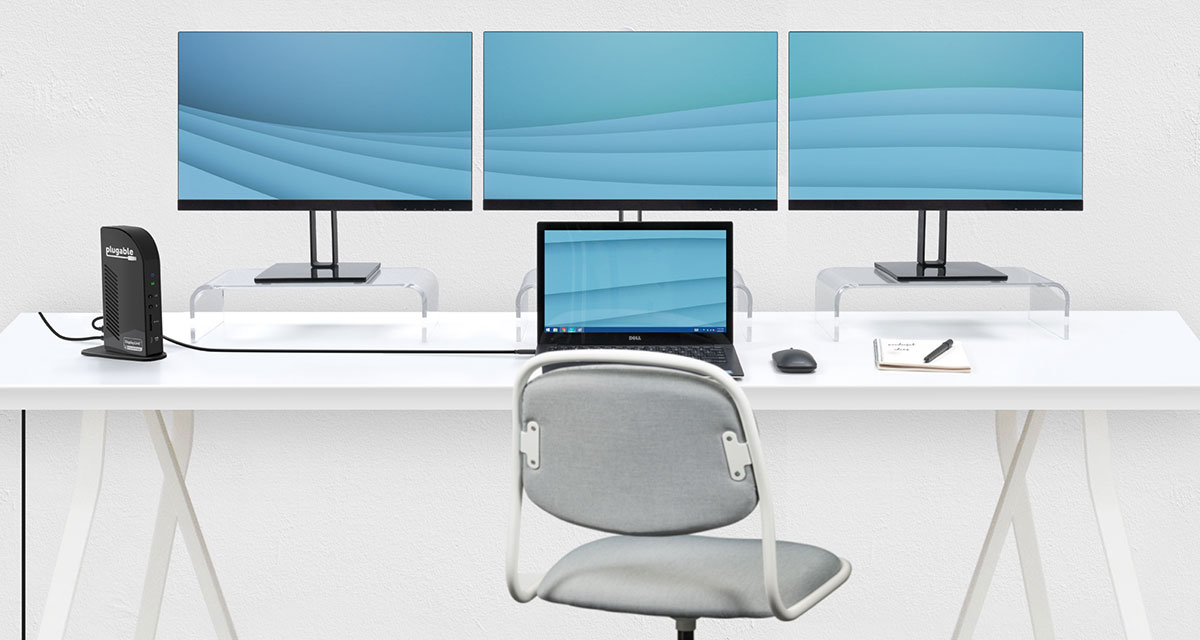
The UD-ULTC4K features three DisplayPort and three HDMI ports, which you can use interchangeably to connect the external monitors to your laptop.
There is quite a lot of technical complexity in how the UD-ULTC4K can run three displays. Look away now if you’re squeamish when it comes to technology. We’ll wake you up when it’s something you need to worry about.

IDG
The UD-ULTC4K utilizes two distinct technologies to provide the three outputs:
The ‘Display 1’ outputs (either DP or HDMI) are driven by DisplayPort over USB-C Alternate mode.
The ‘Display 2’ and ‘Display 3’ outputs are driven by the DisplayLink chip within the dock. Independently, they require a DisplayLink driver to function. DisplayLink uses an installed driver and the system CPU and GPU to convert graphics data on the system into USB data packets. That USB data is then sent over the USB cable as data packets, and converted back to video information and output to the monitors via the DisplayLink chip in the docking station.
However, since it’s not a native video solution, there are some workloads where Plugable doesn’t recommend it; including gaming, video editing, digital audio workstations (DAWs), and protected-content (HDCP) playback. For these workloads, users will want the full throughput of a “bare metal” native GPU connection—such as provided by your choice of DisplayPort or HDMI port on this dock’s Alt Mode.
Supported displays
You can connect three 4K displays at 60Hz via DisplayPort or HDMI with USB4, Thunderbolt and USB-C host laptops that support DP 1.4 Alternate Mode.
On hosts that support DP 1.2 Alternate Mode, you can attach one 4K at 30Hz via Display 1 (Alt Mode – DisplayPort or HDMI) and two 4K at 60Hz via Displays 2 and 3 (DisplayLink – DisplayPort or HDMI).
1,366×768 resolution is not supported on either DisplayLink based DisplayPort or HDMI outputs.
Mac compatibility
Mac users should note that the macOS could have issues with DisplayLink, on specific versions of the Mac operating system (High Sierra 10.13.4 to 10.13.6). Plugable recommends the dock for Macs running macOS 10.15.5-10.15.6 (Catalina), macOS 11 (Big Sur), and macOS 12 (Monterey).
Apple’s latest MacBooks use the company’s own super-fast Silicon processors. One limitation of the M1 and M2 chips is that they support just one external display. The more sophisticated M1 Pro, M1 Max and M1 Ultra do support multiple external monitors.
But fear not, as DisplayLink fixes the M1’s external display limitation, and you can use this dock to add up to three monitors.
Remember, though, that recent MacBooks have Thunderbolt 3 or 4 rather than USB-C ports, so hooking up to a USB-C dock like the UD-ULTC4K will lose a lot of Thunderbolt’s 40Gbps bandwidth. You might be better served with a Thunderbolt-specific docking station—see our roundup of the best Thunderbolt docking stations—although we are yet to test one that can give you access to three displays and that’s what the UD-ULTC4K is all about!
UD-ULTC4K price
At the time of writing the Plugable USB-C Triple 4K Display Docking Station is available in the US only, for $279.
Verdict
If you want a lot of screen space the Plugable USB-C Triple Display 4K Docking Station is your savior. It allows you to connect up to three external displays to your laptop or other USB-C device, including three 4K monitors at full 60Hz.
On the minus side, Thunderbolt users don’t have many triple-display dock options, and might smart at the loss of their 40Gbps bandwidth.
But if you want three big screens on your desk, this dock serves you right and is a great upgrade on the original.


