

At a Glance
Pros
- Stylish
- Easy to use
- Excellent lighting effect
- Wide smart platform support
Cons
- Complex software in places
- In-line power connector
Our Verdict
A combination of style and substance means Lines might be the best Nanoleaf smart lighting kit yet, especially if you don’t like tiles.
Nanoleaf has quickly become one of the key household names in smart lighting and its latest effort is perhaps the cleanest and simplest option yet. Nanoleaf Lines offer an affordable alternative to tiles, and for many, will be more stylish.
Design & Build
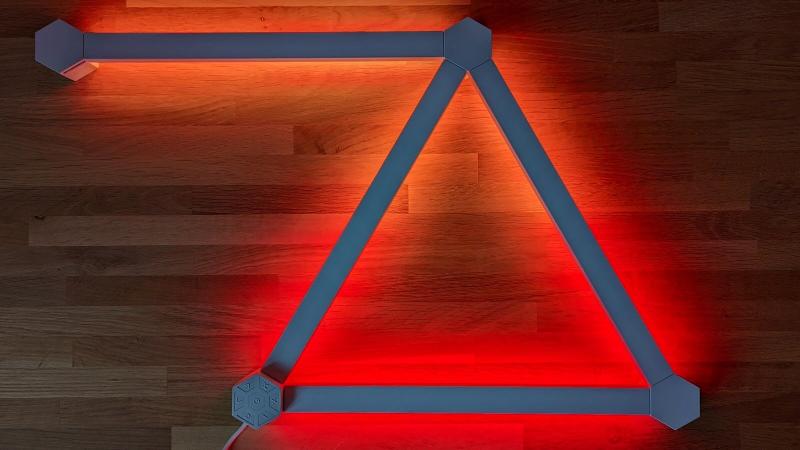
You probably know Nanoleaf for its tile kits, but Lines takes a different approach. In simple terms, these are light strips that connect together in a similar way to its various tile kits such as Elements.
Each strip is 11in in length, including the connections at either end. These easily snap into the hexagonal connectors with minimal hassle. With six slots on each, you can come up with a wide range of shapes.
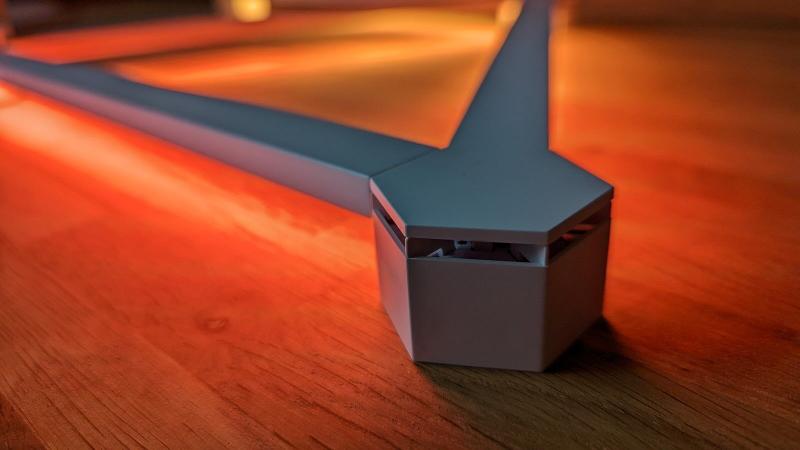
The starter kit comes with nine light strips and nine connectors, so there are limits to what you can do. Still, there are plenty of possible combinations, and an expansion kit with three more strips and accompanying connectors is available if you need them.
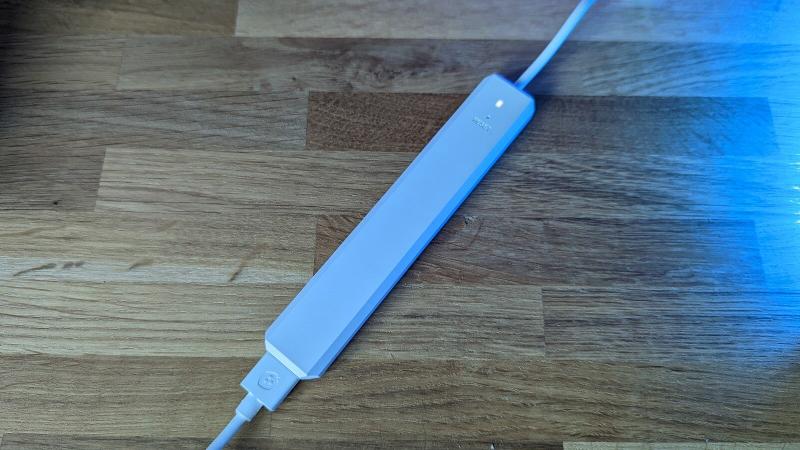
Note that you can use a maximum of 18 lines per 42W power supply and in this case, the cable plugs into a slightly annoying in-line section, although you can probably hide it easily enough.
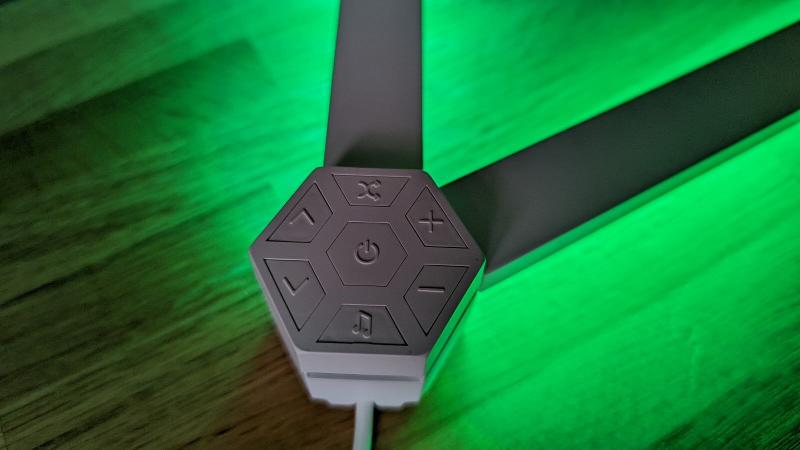
The connectors have covers to hide the inner workings and there’s an additional one which serves as a control panel with click buttons for power, brightness, scene selection and more.
It’s super easy and intuitive but still a good idea to lay out your design before sticking everything to the wall to make sure you’re happy, it fits and everything works. Note that they are designed for indoor use only.
If you don’t like the style of the Lines kit, then Nanoleaf also offers Lines Skins in matt black or matt pink for £14.99/US$19.99. These are essentially plastic covers to easily change the look of the kit.
It’s also worth noting that Flex Connectors will allow you to set up the Lines kit around corners, meaning you could put some of your lights on the ceiling, for example. I haven’t tested these but a pack of three is priced at £12.99/US$14.99.
Features & Performance
Once you’ve figured out your Lines design and have it powered up, it’s time to connect your phone or PC. The Nanoleaf app is available for iOS, Android, Windows and Mac but you’re best off using a mobile device to start with as you get the choice of scanning a QR code or tapping the NFC chip to pair.

Manual connection is available as a last resort, but I didn’t need that even though it took a couple of attempts to get everything working with Wi-Fi networks etc.
Once you’re in, the app is fairly easy to use on the whole, at least for the basics. But there’s a learning curve once you start to delve deeper into the settings. You needn’t worry too much if you just want the Lines kit to display basic colours, adjust brightness and other simple tasks.
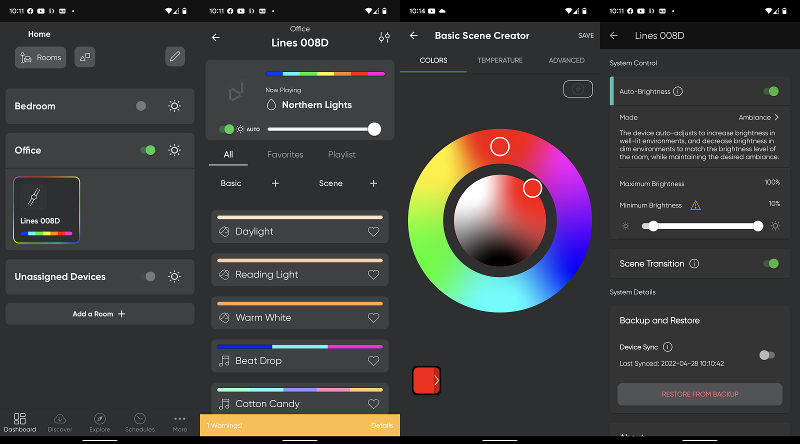
By default, you’ll see a range of basic and more advanced ‘scenes’ to choose from. These do things like transition between predefined colours, while others can react to music. You can create your own personal scenes with various controls available to you and also download others from the discover section of the app.
In the settings menu, you can adjust the auto-brightness, as well as settings like scene transitions – which provides a black pulse to notify you that a transition has taken place. Note that the non-tile design means you can’t play games on the Lines kit.
Beyond the app, there is a range of features available. One of these is Screen Mirror which, if you put the lights near your desktop, will mimic what’s on the display much like Ambilight does on a Philips TV – although it doesn’t work quite as well as Ambilight.
There’s also a wide range of support for smart platforms including Google Assistant, Amazon Alexa, Razer Chroma, Thread, HomeKit, SmartThings and IFTTT, so there’s a large scope of what you can do, from voice control to integration with other gadgets. These may be the smartest smart lights around.
While Nanoleaf tile kits shine light outwards, Lines has its lighting on the back so it shines against your wall. I really like this and I’m sure a lot of people who haven’t been won over by the other Nanoleaf options may find this is more to their taste.
On the back of each strip are 24 LEDs, split into two optional zones. They’re not technically as bright as other Nanoleaf products at 20 lumens, but I found them to offer plenty of brightness and often used them a long way off maximum.
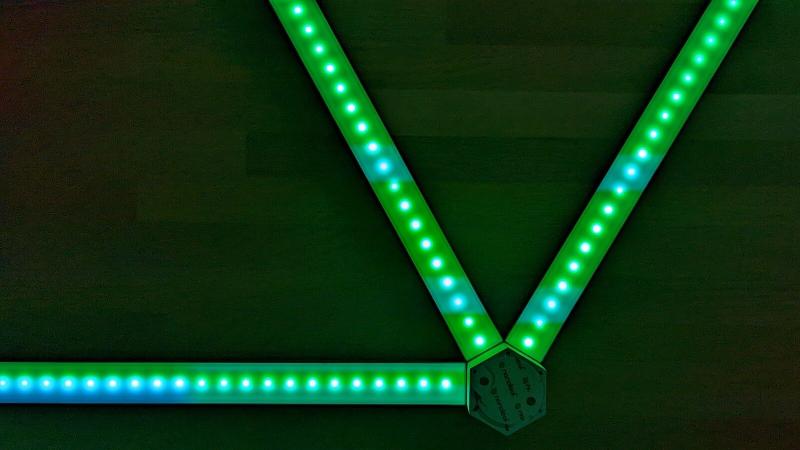
Colour temperature ranges from 1200-6500K and as usual for Nanoleaf, Lines supports more than 16 million colours. There can be some lag when making adjustments such as brightness but nothing too annoying.
If you’re worried about longevity, the Lines kit is rated for a total of 25,000 hours of usage and comes with a two-year warranty. That figure means you can use them for five hours a day for around 14 years.
Price
The Nanoleaf Lines kit is one of the cheaper options available from the brand at £179.99/US$199.99, matching the Shapes Hexagons kit which comes with nine panels, although that’s also available in a smaller 5-panel kit, too.
You can buy it directly from Nanoleaf UK or retailers such as Currys or Very. In the US you can buy from the official store or the likes of Apple and BestBuy.
If you want more than nine Lines then an Expansion Pack with three more costs £49.99/US$69.99. There are also Skins at £14.99/US$19.99 for a pack of nine as well as Flex Connectors for going around corners or onto the ceiling at £12.99/US$14.99 for a three-pack.
Check out our best smart lights charts to see what other controllable lighting you can get.

Verdict
I’ve enjoyed previous Nanoleaf smart light kits, but Lines is my favourite so far thanks to its balance of value, style, ease of use, performance and features.
You can’t play games on it, but I wouldn’t be surprised if that’s something people do a few times with the compatible kits and then the novelty quickly wears off, unless you’re buying them for a kid’s room.
For anyone else, the Lines kit provides the same versatility and feature set of more expensive options but, in my opinion, a much more stylish way with a more pleasing result. Only small caveats hold it back from getting full marks.