


At a Glance
Pros
- Attractive price
- Fast printing speeds
- 2-sided printing
- Good text and photo quality
Cons
- No ADF
- Can’t print on A4 glossy paper
Our Verdict
The HP Envy Inspire 7220e is a fast and versatile all-in-one colour printer/scanner/copier for home office users that’s on for a low price, and can be cheap to run, with the right subscription. If you can live without printing on glossy A4 paper and an automatic document feeder, it’s a steal.
The Envy Inspire 7220e is a budget home office all-in-one colour inkjet printer, scanner, and copier from HP, capable of printing on both plain and glossy photo paper.
Newly launched, it’s available to buy now for just over £100, and offers buyers a lot for that very attractive price. It boasts fast printing times for both text documents and colour photos, fast scanning times, and it’s covered by HP’s Instant Ink subscription plans, which can work out being good value for money long-term for families, busy households, or anyone who needs to get a lot of printing done.
With support for Windows, MacOS, Chrome OS, iOS and Android devices, the HP Envy Inspire 7220e can fit into practically any home office set up, and thanks to Wi-Fi and USB support, there are wireless and wired connectivity options.
Design & Build
- Compact plastic chassis
- Two colours
- Built-in touchscreen
The HP Envy Inspire 7220e is a compact all-in-one with a low profile. Predominantly made of white plastic, there are coloured accents on the scanner lid and paper tray, which can either be Surf Blue or Portobello Beige – I was sent a beige one.
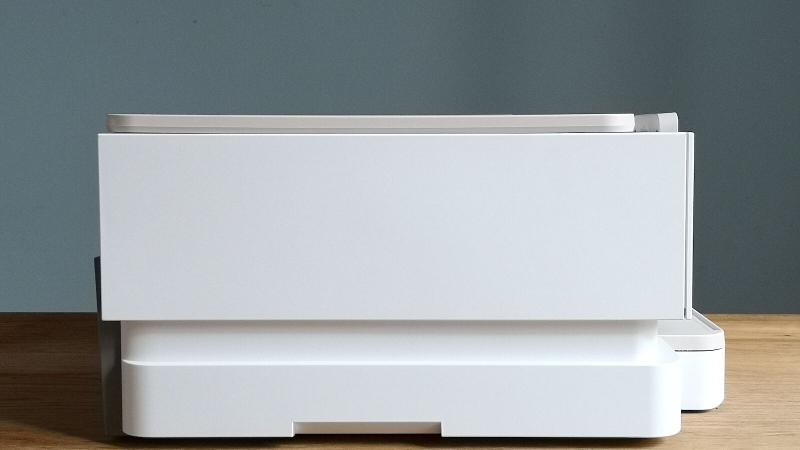
It might look bulky, but the HP Envy Inspire 7220e is reasonably light, weighing roughly 7kg. It features recesses on the sides, making it easy to pick up and move around.
All of the HP Envy Inspire 7220e’s discrete sections, from the scanner lid to the paper tray to the printer hood are clearly demarcated either by differently coloured plastic, or indentations that show you exactly where to grasp and pull things. It is quite literally easy to get to grips with.
While you can control the printer remotely with the HP Smart mobile and desktop apps, there’s also a built-in 2.7in adjustable touchscreen control panel. The touchscreen itself is pretty responsive, and the Android-style user interface is easy to navigate.
The scanner bed is lightweight and opens easily, but there’s no slow-close mechanism, so you need to push it all the way back. The main hood, however, features a slow-close, making setting up and changing ink cartridges no problem.
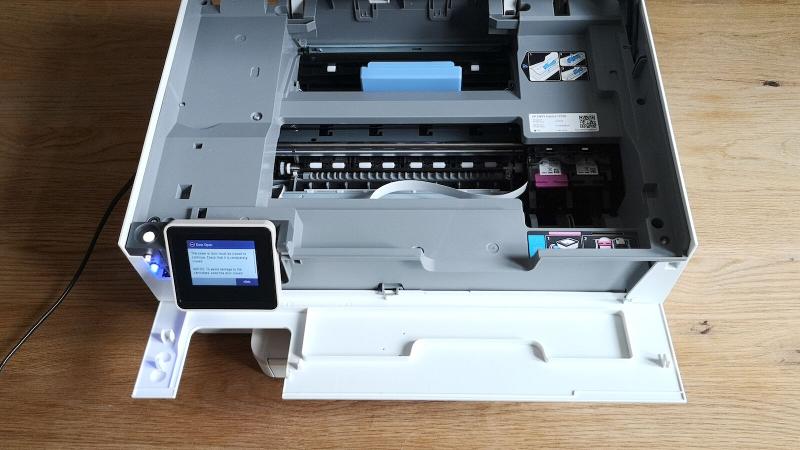
The paper in-tray features two tiers, with the top section reserved for glossy photo paper, and the bottom section for plain. It can hold up to 15 sheets of photo paper (max size 13 x 18 cm) and up to 125 sheets of regular paper (max size: A4).
While the HP Envy Inspire 7220e can function as a photocopier, there’s no ADF (automatic document feeder) here, so you’ll have to scan and print anything you want multiple copies of manually. This is common for affordable printers.
Set-up, Apps & Wireless Printing
- Wide OS support
- HP Smart apps
- Wi-Fi and USB
You can set up the HP Envy Inspire 7220e either from a Windows, Mac OS, or Chrome OS device, or an iOS or Android mobile device via the HP Smart apps – whichever way you do it, it’s simplicity itself. The only thing you’ll need to have to hand is your home network’s Wi-Fi password.
As the HP Envy Inspire 7220e is Apple AirPrint compatible, there’s no need for any drivers to be installed – Windows users may have to download and install these from HP’s site, and Chromebook owners may need to install this extension.
The HP Smart apps are good at guiding you through the set-up process and make things easy for anyone who hasn’t set up a printer before. The cartridges slot into the cradle easily, and the printer arm feels reassuringly robust.

Of the two, the mobile HP Smart apps are more convenient, and probably what you’ll be using most of the time. You can print from Google Drive, Google Photos, Dropbox and Facebook via both apps, but the iOS version adds Box, Evernote, and, naturally, Apple iCloud support as well.
Finally, the Mopira app for Android devices is also supported, which allows for quick printing of files and photos stored on your phone’s gallery. Handy, if you don’t want to have to use the HP Smart app.
If you want to run any maintenance cycles, you’ll need to use the desktop apps, or better still, just use the HP Envy Inspire 7220e’s control panel.
The HP Envy Inspire 7220e features HP’s ‘self-healing’ Wi-Fi technology, which helps to establish the best Wi-Fi connections, and automatically reconnect if there are any interruptions. It has a dual-band Wi-Fi antenna, and via the HP Smart mobile app, you can set it to make use of the less-congested 5GHz band.

If you’re setting the printer up in the same room as a router or access point, it’s a good idea to do this. If you can’t get on the 5GHz band, or you’re still having connection issues, consider investing in a mesh Wi-Fi networking solution.
Alternatively, you can connect directly to the HP Envy Inspire 7220e from a desktop or laptop if you have a Type-B USB cable, and send print jobs the old fashioned way.
Performance
- Up to 14.63ppm
- 300dpi scanning
- Glossy doesn’t support A4
The HP Envy Inspire 7220e prints pages of black text quickly, and pages with text and colour graphics are produced pretty quickly as well.
Printing a 20-page test document took 1 minute and 22 seconds, giving me a pages-per-minute score of 14.63ppm. As expected, printing a test document with a mixture of text and colour pie charts and bar graphs took a bit longer – 2 minutes and 4 seconds, which works out at 9.6ppm.
That’s lower than the 15ppm and 10ppm speeds HP claims that the Envy Inspire 7220e is capable of, but only slightly, and these are good speeds for a home office inkjet in this price range.
That’s faster than last year’s Canon Pixma TS7450, and HP’s own Envy Pro 6420. It’s not as fast as a laserjet, like the Brother DCP-L3510cdw, but then again, you shouldn’t expect it to be. If you need to print off lots of reports, letters, or essays in a hurry, then the Envy Inspire 7220e might be the printer you’re looking for.
Print quality on the Normal setting is also very high, with text looking rich and well-defined, and blocks of colour looking solid. Grain is only really noticeable if you peer at pie charts, and so you’ll only really need to kick things up to Best quality for important documents.
The only snag I ran into is that black ink needs a few seconds to dry, if you grab sheets the moment they’re ejected from the HP Envy Inspire 7220e, you’ll end up with very inky fingers.

Photos printed on plain A4 took on average 31 seconds, while photos printed on 10 x 15 cm glossy paper took only slightly longer, 34 seconds on average.
Print quality, especially on glossy paper, is good, with skin tones looking natural, and artificial colours looking rich. Blues perhaps look a little too rich, but not in a way that’ll make your holiday snaps look unnatural. Thanks to the guides in the paper tray snapping everything into place, alignment issues were few and far between in testing – I only had to reprint photos a couple of times end even then, they weren’t horribly misaligned, just not quite dead on.
It’s, therefore, a shame that the HP Envy Inspire 7220e can’t print on A4 photo paper as well, as I expect that the results would be just as good.
While there’s no automatic document feeder, it doesn’t take long to scan, with both plain text documents and colour photos taking roughly 12-15 seconds to scan at 300dpi.
Running Costs
- As cheap as 5p per page
- Choice of cartridges
- Optional HP Instant Ink
Like many HP colour inkjets, the Envy Inspire 7220e uses a two cartridge system, one black ink cartridge, and one tri-colour (cyan, magenta, yellow). It takes the regular-sized HP 303’s and the larger HP 303XL’s.
The standard RRP for the HP 303 black and HP 303 tri-colour cartridges is £16.99 and £20.99 each, and these give you around 200 and 165 pages’ worth of ink. That’s a respective cost-per-page of 8p and 12p.
The larger HP 303XLs are better value for money; a HP 303XL black costs £35.99, and promises 600 pages’ worth of ink – or 5p per page – while a HP 303XL colour cartridge costs £40.99, and gives you 415 pages’ worth – or 9p per page.
These prices are about par for the course for inkjet printers in this price range. The bigger cartridges are worth picking up, especially if you’re able to find them as part of a bundle deal somewhere.

If you print documents infrequently, then replacing cartridges when you need them is probably the best option. Busier households have the option of getting one of HP’s Instant Ink subscriptions, which automatically send out new cartridges to you in the post, whenever the printer detects that you’re getting low on ink. Price plans are worked out based on how many sheets you get through in a month, and are currently priced as follows:
15 pages: 99p/month 50 pages: £2.99/month 100 pages: £4.49/month 300 pages: £9.99/month 700 pages: £22.49/month
The middle option and the 300-page option compare well with the HP 303 prices, and you can see already why if you are printing hundreds of pages a month, a subscription might be a good shout.
Price & Availability
The HP Envy Inspire 7220e is available to buy now. You can pick this up directly from HP in the UK, where it’s priced at £130. It’s also available from Amazon, Argos, Ryman and John Lewis.
The Envy Inspire 7220e was not available from the HP Store in the United States at the time of writing, but a similar model, the HP Envy Inspire 7255e, is available now, for $219.99.
You can also get the the 7220e from HP in Australia, where it’s priced at $AU149.
In the US the HP Envy Inspire 7255e variant is also available from Best Buy again for $219.99 – it’s listed at Amazon, but was marked as currently unavailable.
Check out our chart of the best printers to see what other options you have.
Verdict
The HP Envy Inspire 7220e is a great value versatile home office all-in-one that’s got a couple of missing features, notably ADF and the ability to print on A4-sized glossy paper.
But if you can live with this, and primarily want something to print documents on, then the low RRP, high speeds, and high quality results make the HP Envy Inspire 7220e a good choice.
Specs
HP Envy Inspire 7220e: Specs
- Colour inkjet all-in-one printer, copier, scanner
- Ink type: Cartridges
- Print resolution: 4800 x 1200 dpi (colour), 1200 x 1200 dpi (black)
- Scan resolution: 1200 x 1200 dpi
- Maximum paper size: A4 (plain), 13 x 18 cm (glossy)
- Dimensions: 191 x 460 x 383 mm (H x W x D)
- Weight: 6.91kg


