

At a Glance
Pros
- Great value
- Good range of colour and brightness options
- Easy to use
Cons
- The camera isn’t ideal, for either privacy issues or aesthetics
- Set up is a bit fiddly
Our Verdict
If you can get past the camera as a key part of the kit, this is an impressively budget-friendly way to get responsive TV lighting for gaming or film-watching.
Govee’s Flow Pro Smart LED Light Bars is a mouthful of a product name but then, it’s a slightly unusual product and Govee is trying to hit a lot of keywords to describe it.
Essentially, it’s a smart light system that will sync up with your TV display, producing a glow of colour around your TV or monitor that mirrors and complements what’s on screen. What it promises to deliver is some of the magic of the likes of a Philips Ambilight TV for a very reasonable sum.
And, if you’re playing music, it’ll pulse along in time to the beat. It’s also Alexa and Google Assistant compatible, so you can use voice control to switch it off and on.
That’s quite a tall order for such a budget-friendly device and if it doesn’t quite get there, it makes a pretty good go of it. There’s just one thing to note. It’s only suitable for use on a 27in – 45in TV or monitor.
Setting up the Flow Pro
One of the most popular ways to backlight a TV is to use a light strip. If you’ve ever spent time painstakingly sticking an LED strip to the back of your TV (have fun trying to get it to go around corners!), you’ll be pleased to hear that the Flow Pro is considerably easier to set up.
You’ll need a Wi-Fi connection, Bluetooth and to download the Govee app, which is free and available for either Apple or Android.

In the box, you’ll get two light bars (roughly 25x5x5cm) to be used as backlights. These are chunky triangular bars, the same shape as a Toblerone, with a white RGBIC light on one side that can display six colour segments. The bars come with stands and screen mounting brackets, so you can either stick them to the back of your TV or stand them on either side of it, like a tiny protective guard.
Bear in mind that if you don’t use the screen mounting brackets and opt to display the light bars, there’s a very visible slot facing forward in each light bar, which does spoil its line and the look of a TV set-up. It’s one of the ways that the kit’s budget is apparent.

As I don’t have an exceptionally wide TV stand, I opted for adhesion. The bars didn’t stay stuck for very long, with one clattering down during a tense film scene (and providing an effective jump scare). The other one soon joined it.
This may be the fault of my TV, which has a textured back. In any case, I decided to make use of the stands and hide the bars behind the TV. This was a good option for me but it obviously won’t work if you have a wall-mounted TV or monitor.
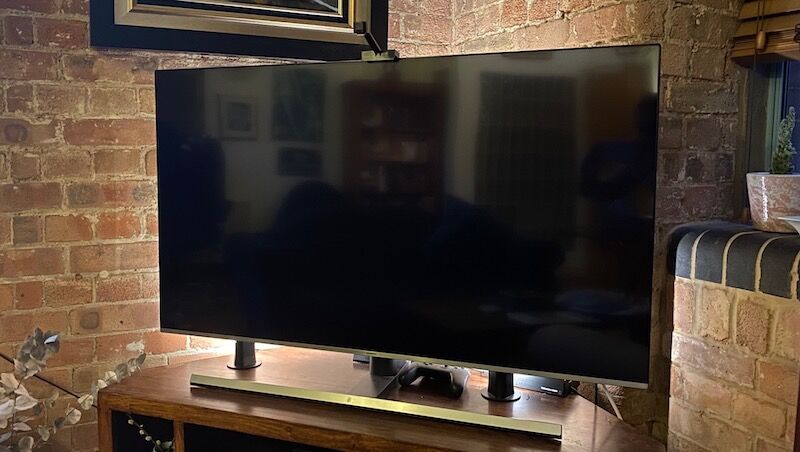
The other key component of the kit is a camera. The camera will end up pointed at your TV or monitor screen to analyse what’s playing and respond to it. This may be the most divisive part of the set-up. After all, who really wants another camera from a random tech company in their home?
However, nothing is broadcast or uploaded from the unit. Still, that may not be reassuring enough for everyone, especially given that the control box, which is part of the kit, necessarily features a mic so that the lights can sync with music.
The camera can be fitted at the top or the bottom of your screen or monitor. If you choose to fit it underneath, make sure it doesn’t cover your TV’s infrared receiver. I set it up at the top. It blended in fairly well and, although I didn’t love the look of it, I stopped noticing it after a while.

Also in the box is a block of orange foam cubes. You’ll need to set these up around your TV frame and use the app to calibrate the camera. It’s another step in what was a slightly fiddly process.
Performance
Once it’s all set up, how does it work? I found the music syncing to be reasonably successful. It works better with a thumping bassline.
And as for the TV syncing, it really depends on what you’re watching. If it’s a late-night horror film, it definitely adds to the atmosphere, although the actual colour coordination can be hit and miss.
If, on the other hand, you’re watching a documentary about cheese-making, it looks slightly daft and you’re probably going to switch the function off.
However, as well as music and video syncing options, you can opt for a fixed colour or any one of a number of pre-set scenes to use as mood lighting, such as “candlelight” (not entirely unlike a candle, but close) or “romantic” (lurid purples and reds that would better set the scene for a homicide than a romantic evening).
In fact, Govee says you can create 16 million colours, although if you have any experience of smart lighting of this kind, you’ll know that 15,999,900 of them are wildly garish. Still, you can adjust brightness, blend colours and experiment until you find something you like. If you want something simpler, you can stick to white and adjust between colder and warmer hues.
The bars have a maximum output of 400 lumens, so you won’t be using their illumination to read a book.

Using the Pro Flow over time, I found that I got used to backlighting and missed it when it wasn’t in use. As well as creating atmosphere, backlighting can protect your eyes from strain and help your perception of contrast on the screen.
Price and availability
Govee’s Flow Pro Smart LED Light Bars are available from Govee itself and from Amazon in both the UK and the US. The prices are a bit better on Amazon, where you can currently buy them for £69.99 in the UK or $67.99 in the US.
Verdict
This is not a flawless product. The set up takes time and the addition of the camera may be off-putting to some. Still, if you’re after a budget-friendly way to get responsive lighting for movie watching or gaming, it has to be one of the best options around.
For more smart lighting options, have a look at our round-up of the best smart lights we’ve tested.
Specs
Govee Flow Pro Smart LED Light Bars (H6054): Specs
- For 27-45 inch TV or monitor
- Model: H6054
- RGBIC Coloured Lighting
- 1080p HD Camera
- Voice + App Control