


At a Glance
Pros
- Waterproof
- Includes case and Kids+ subscription
- Can be shared with an adult
Cons
- Fire Tablets can be cheaper
- Kids+ subscription lasts just a year
Our Verdict
With a good-sized screen, waterproofing, long warranty and bundled case, the Paperwhite Kids is ideal if you want to encourage your kids to read, and have a Kindle you can use too.
The Kindle Paperwhite Kids is Amazon’s second eReader designed for children. As with the first, the hardware is the same as the non-Kids version: it’s the bundle you get with it that’s different.
If you know anything about the Kids Editions of Amazon’s Fire tablets, you won’t be surprised to learn that this means the Paperwhite Kids comes with a case, a two-year warranty which covers accidental damage and a subscription to Kids+.
Kids+ includes over a thousand books suitable for ages up to 12, but because this isn’t Fire tablet, you miss out on the apps, games and videos which are also part of the subscription. If you happen to have a Fire tablet, then you can take advantage of the subscription on that, too.
Even if you don’t, you’re still getting good value. The regular 11th-gen Paperwhite costs £129.99 / $139.99, yet the Kids version is only £10 / $20 more. Effectively, you’re getting £243.98 / $269 worth of stuff for only £139.99 / $159.99.
Kids’ Kindles don’t have adverts like the regular versions, and usually you have to pay extra if you don’t want those – another reason why it’s better value. And if you’re not averse to spending this sum of money on an eReader for a child, it’s a veritable bargain.
Compared to Amazon’s Fire tablet range, which starts at £49 / $49, the Paperwhite Kids looks relatively expensive. But given how difficult it is to limit how much screen time kids have each day, the fact that the Paperwhite Kids can’t run apps and games is easy to see as an advantage.
In fact, Amazon even positions the Kindle Kids Editions as no-distractions devices that don’t really count as screen time.
For this review, Amazon sent over the plain black case which matches the black tablet, but you can opt for one of two much more child-friendly designs: Emerald Forest and Robot Dreams.

Features & design
- Waterproof
- 6.8in touchscreen
- Up to 10 weeks of battery life
I’m not going to dwell too much on the hardware here: you can read our separate in-depth review of the 2021 Paperwhite for more details.
Suffice to say that this Kindle is a big upgrade over the entry-level Kindle. Though less than an inch larger, the bigger screen makes a bigger difference than you might think, and it’s a great size for kids.
The built-in light makes it possible to read in the dark and the new Warmth slider means it’s possible to adjust the colour temperature from the default ‘cold’ light to a warmer hue that’s easier on the eyes.
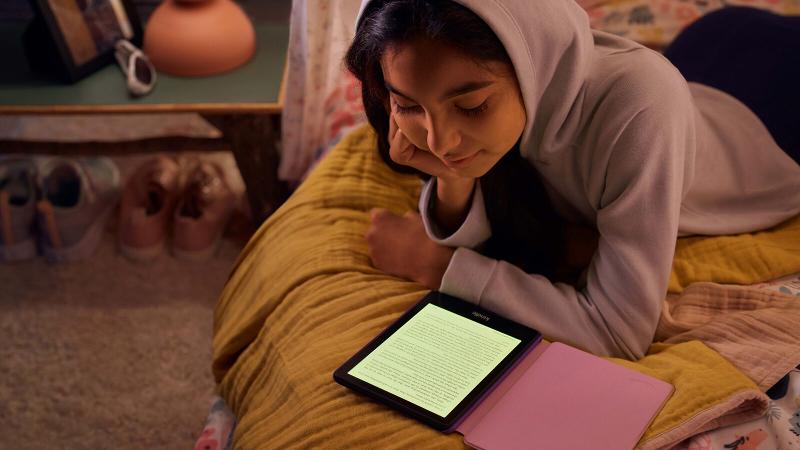
It’s basically ‘night mode’ which reduces blue light and, in theory, is less disruptive to sleep when reading close to bedtime. This can be scheduled so kids don’t have to remember to enable it.
Arguably more important is the IPX8 rating. That means the Paperwhite Kids will survive most liquid-based accidents, whether it’s being dropped in the bath, or even in shallow seawater.
It also means you can wash off dirt under the tap. Just don’t put it in the dishwasher.
Being an E Ink screen, everything is in monochrome and there’s no colour. This means illustrations in books aren’t as captivating as they are in colour, so picture books for younger kids aren’t the best on the Paperwhite Kids and you might be better off either with actual books or a Fire tablet, which has a colour screen.
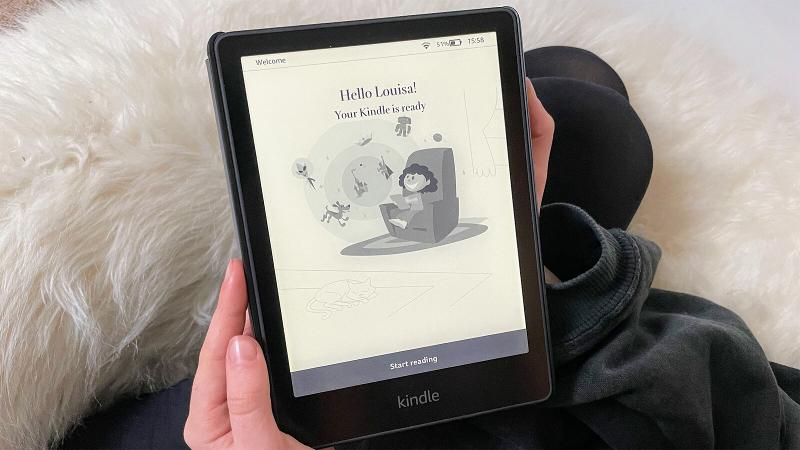
It’s also worth knowing that unlike tablets and phones, an E Ink touchscreen isn’t nearly as responsive, so kids will be stabbing at buttons repeatedly instead of waiting for things to happen. It’s best to manage their expectations when you first set up the device.
The interface is the same as on the cheaper Kindle Kids Edition, and is relatively easy to use. Opening a book and going to the next or previous page is simple. However, you’ll probably need to explain to your child how to navigate beyond that, to flip to a different chapter, for example.
Kids+
The ebook part of a Kids+ subscription includes over 1000 books. They’re divided into three age ranges: 3-5, 6-8 and 9-12.
When you create a profile for your child (and you can create up to four of these), the content will be tailored to their gender and age.
Content also differs across regions, with the UK version offering books from authors such as David Walliams, Jaqueline Wilson, Jeff Kinney, Tim Collins and more, while in the US you’ll find Percy Jackson, Warriors, Narnia and other titles.
There is a good amount of crossover, with the Harry Potter series being available in both regions.

Kids can find books in various ways. Just like Netflix and Amazon Prime Video, they can see books recommended for them, top picks for everyone and can also browse by characters and themes.
Those include Disney, Nickelodeon, classic literature, Barbie, fantasy, space, school & learning, Audible, yoga & meditation, exercise and more.
There are around 100 Audible books to listen to, but you’ll need to pair Bluetooth headphones with the Kindle to listen to them. If you have an Amazon Echo, kids can also listen to the audio books on that, which they often prefer to headphones.
When the subscription expires after 12 months, you’ll be billed automatically each month for Kids+ unless you cancel. So if you don’t want to pay, set a reminder to cancel before the year is up.
Reading
The bigger screen, which is also sharper than cheaper Kindle Kids Edition, makes reading a nicer experience. You get a few extra lines on each page – depending upon the font and size you choose.
When reading in the evening, the amber tint is much nicer than the blueish hue you see without it, and there’s also a Dark Mode which turns the text white and background black.

Because of the way E Ink screens work, this doesn’t save any battery power, but it’s useful option to have.
Battery life itself is claimed to be up to 10 weeks, though that will decrease if the light is used a lot, and at higher brightness levels. Listening to audiobooks over Bluetooth will also affect battery life, as will leaving Wi-Fi on all the time.
In the box is a USB-C cable, but there’s no charger, so you’ll have to use an existing one (with a standard USB port, not USB-C) or a USB port on a computer to charge the Paperwhite Kids.
If you want, you can keep tabs on what your child has been reading and listening to via Amazon’s Parent Dashboard. You can also add ebooks you’ve purchased from the Kindle store to the Paperwhite Kids from the Dashboard, which is a convenient way to manage the content on the device.
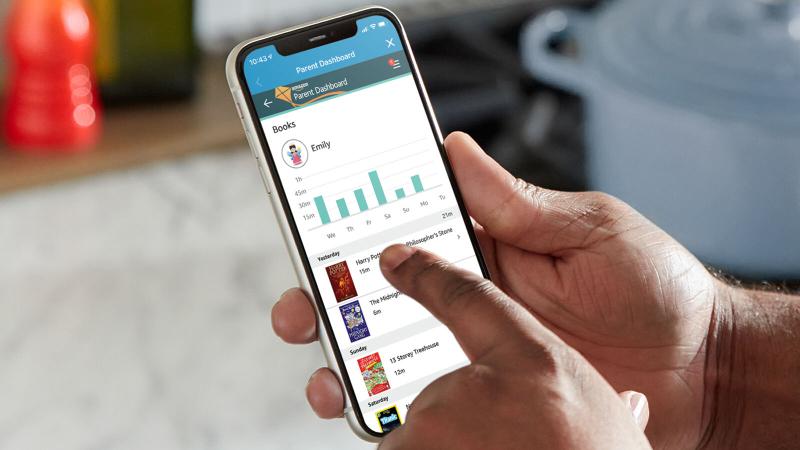
It’s not available quite yet, but soon you’ll be able to set ‘bedtimes’ in the Dashboard which will apply to the Kindle. Currently, if you set screen limits in your child’s profile, they’ll only work on a Fire tablet.
Price & availability
You can buy a Kindle Paperwhite Kids from Amazon in the UK and in the US. It’s not available yet in other regions such as Canada or Australia.
The regular price is £129.99 / $159.99, but in the US, Amazon had discounted it to just $120, which really is a bargain.
The only real alternative is the cheaper Kindle Kids model which costs £99.99 / $109.99. And if you’re on a tighter budget, that’s a good deal if you don’t mind that it isn’t waterproof.
Other Amazon eReaders aren’t designed with kids in mind.
Verdict
The Paperwhite Kids is a great eReader which is better value than the cheaper Kindle Kids thanks to the fact it’s waterproof and has the larger, sharper screen. The Paperwhite Kids also ‘turns’ pages faster than the Kindle Kids, and is generally more responsive.
It makes the most sense if it’s shared with an adult and, because the device itself is identical to the regular Paperwhite, there’s absolutely no reason why you couldn’t do this.
Compared to the 7- and 8in Fire tablets – even the Kids Editions – the Kindle Paperwhite Kids looks a touch expensive given it’s a single-use device and the tablets can also play videos, games, apps, music and other things. But if you want to remove those distractions, a Kindle could be exactly what you need to encourage your child to read more.
Specs
Amazon Kindle Paperwhite Kids: Specs
- 6.8in e-ink display, 300ppi
- 17-LED backlight with adjustable colour warmth
- 8GB storage
- Dual-band Wi-Fi
- Bluetooth
- USB-C
- 174 x 125 x 8.1mm
- 205g
- Two-year warranty
- Case and 1-year Kids+ subscription included


